Context: PEXA is a browser based software platform for conveyancers and lenders to collaborate on property settlements. Typical settlements include remortgages & sales of property.
Frequently used accounts
The Frequently Used Accounts feature was designed to reduce human error and improve efficiency during the financial settlement process within the PEXA platform.
Overview
Previously, users were required to manually enter account details every time they created a workspace. This often led to data entry errors, mismatched account information, and ultimately, delayed or cancelled settlements.


Role: UX Designer

Team: Cross-functional (Product Owner, Business Analyst, Engineering, QA)

Goal: Streamline account input, reduce human error, and introduce account management for subscriber admins.
Original solution
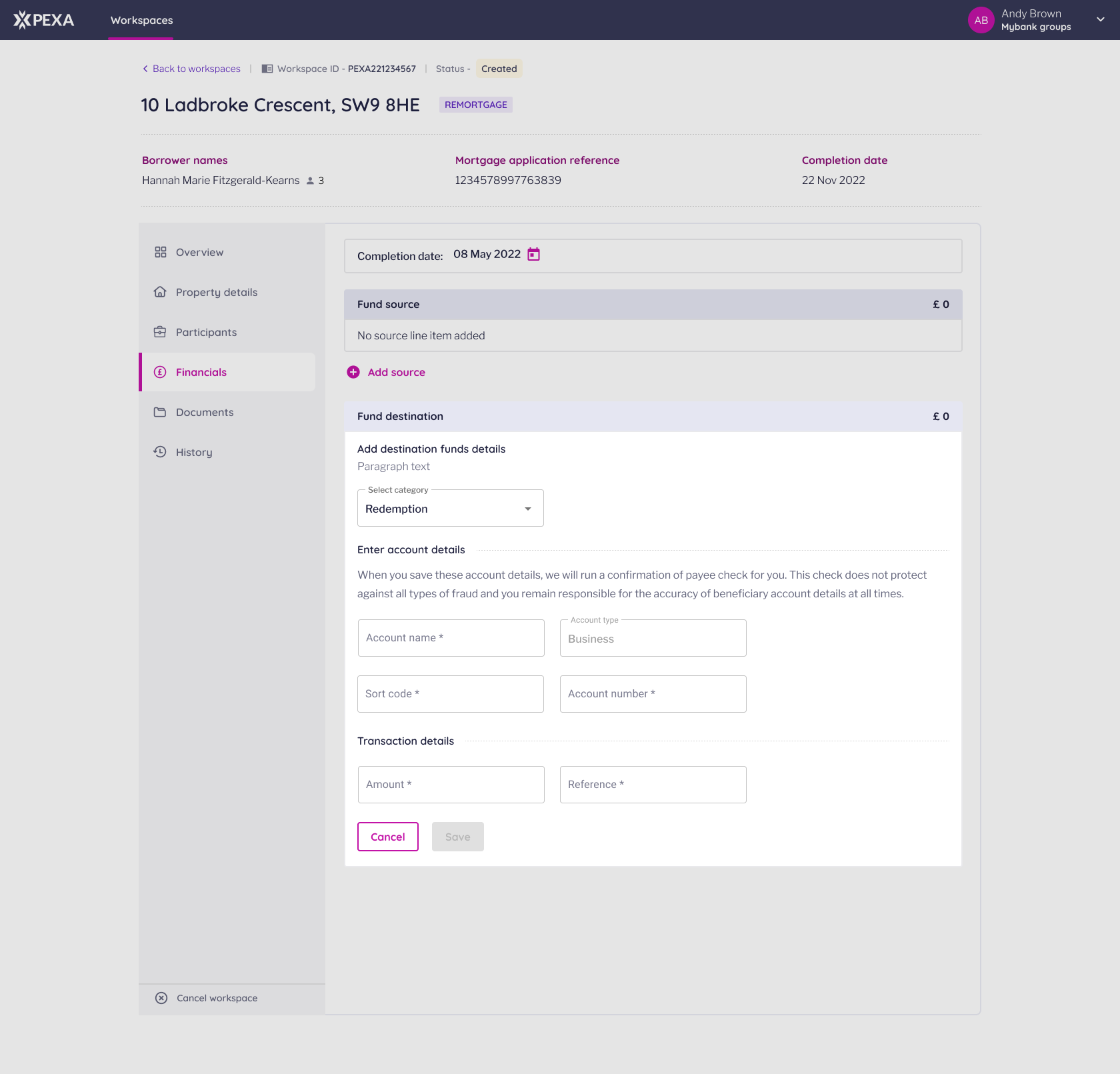
Original solution screen : Enter account details
Each workspace manages the tasks for a specific property settlement. Here, users enter and save financial account details — one of several steps in finalising the transaction.
Original flow
Problem space

Manual financial account entry was one of the highest sources of user error on the platform.


Every incorrect input meant:
• Mismatched account data between parties
• 'Account details match' checks cost a fixed fee to PEXA per call
• Failed or delayed workspaces
• Frustration for both subscribers and PEXA Support

Research & Insights
We investigated user pain points through customer support logs, user interviews and internal usability tests.

Key findings:
• The same financial accounts were used repeatedly by banks and law firms.
• There was no way to save or select previously used accounts.
• Errors occurred frequently during funds transfer setup because of mismatched data entry.

This highlighted a clear opportunity:
Users needed a reliable, centralised way to save, select, and manage frequently used accounts — while maintaining company-level control and data integrity.
The Solution
We introduced a two-part solution
1. Admin-Controlled Account Management
Users with administrative permissions can now:
• Add, edit, or delete saved financial accounts
• Assign custom names and company-specific labels
• Ensure consistent formatting across all subscriber users

These saved accounts are then made universally available to all users within that company who have the add-financial-accounts permission.
2. Dropdown Selection in the Workspace
When creating or editing financial details in a workspace, users now see a dropdown list of frequently used accounts.

They can quickly select from previously saved entries instead of manually typing.
Account names and formats are consistent with company standards.

Reduces repeated input, speeds up workflow, and eliminates mismatched entries.
Design process
1. Mapped the existing workflow for how users currently input financial details in workspaces.
2. Identified key failure points where errors were most likely to occur.
3. Designed a simple dropdown integration that fit seamlessly into the current workspace layout.
4. Created a management interface in the Admin Portal for adding, editing, and tracking financial accounts.
5. Collaborated closely with developers and POs to ensure compliance with security and access controls.
6. Validated the design through internal usability testing.
Outcome

• Significant reduction in data-entry errors for account information.
• Faster workspace setup with fewer support tickets related to financial mismatches.
• Improved user trust in the accuracy of financial workflows.
• Created a scalable framework for future automation and account integration.
Reflection
This feature was a great lesson in reducing friction through pattern recognition. By noticing that users were repeating the same task — and making the same mistakes — we were able to design a simple but high-impact solution.

We realised this gap existed because repeat data inputs weren’t considered when the original flow was designed. Since then, we’ve made a point to document common or recurring input patterns early in the scoping stage, so similar “frequently used” dropdowns can be applied where needed.

This approach also helped our design team create more realistic sample data for prototypes and staging environments, making testing and reviews feel much closer to the real product.